Working with payment proposals
Payment proposals can be created in two ways:
- Automatically, using filters and options (see Creating payment proposals).
- Manually, by creating a blank payment proposal (described in this article).
This article explains how to create empty payment proposals and how to review and edit existing ones.
For more information on how to manually fill an empty payment proposal card, see the Manually extending payment proposals article.
To edit and review payment proposals
The Payment Proposals page shows all proposals that have been created but not yet posted.
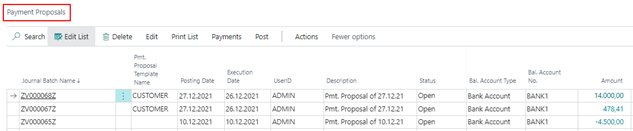
From this page, you can:
- Open and edit proposals
- Review amounts and payment details
- Navigate to related payment lines
- Delete proposals (if status is Open)
The payment proposal fields
The following fields are available in the list and card view:
| Field | Description |
|---|---|
| Journal Batch Name | System-generated journal batch used for posting. |
| Pmt. Proposal Template Name | Indicates if the proposal was created from a template. |
| Posting Date | Displays the posting date defined during creation. Can be changed while the proposal is open. |
| Execution Date | Displays the execution date for the payment. Can be changed while the proposal is open. |
| User ID | Shows the user who created or last changed the proposal status. |
| Description | Automatically generated description (for example, based on the work date). |
| Status | Shows the current processing status of the proposal. |
| Bal. Account Type | Specifies the balancing account type (G/L account or bank account). |
| Bal. Account No. | Specifies the balancing account number. |
| Amount | Total amount of the payment proposal. |
| Amount (LCY) | Total amount in the local currency. |
Bal. Account Type and Bal. Account No. correspond to the payment account fields defined during proposal creation.
The status of payment proposals
The Status field indicates the current stage of the payment proposal:
| Status | Description |
|---|---|
| Open | The proposal has been created but no payments or postings exist. You can edit or delete it. |
| Edited | Currently not used. |
| Released | The proposal has been released. Only authorized users can release it. |
| Payment Done | Payment files have been created. |
| Posting in Progress | Postings are being created. |
| Posted | The proposal has been posted and moved to the registered proposals page. |
Additional information and actions
FactBoxes and details
In the list view, additional information can be displayed on the right:
- Payment totals (in LCY)
- Payment types per amount
- Errors and warnings
Errors and warnings
- Errors prevent further processing
- Warnings provide additional information but do not block actions
Navigate to payment lines
You can access detailed payment lines directly:
- Select a proposal
- Click an amount field
This opens the related payment overview.
Delete payment proposals
You can delete:
- Individual payment proposal cards
- Entire payment proposals
Deletion is only possible when the proposal status is Open.