Reviewing remittance advice setups
After completing payments, you can generate the remittance advice to notify recipients of the payment details. Accurate remittance information is essential for ensuring that payment notifications are sent correctly and can be matched with the corresponding invoices. Misconfigured setups can lead to failed notifications, missing details, or delays in reconciliation.
To help identify and resolve such issues efficiently, Continia Banking includes a dedicated Remittance Advice Setup Check page that lists the results of automatic checks and guides you through the necessary corrective actions.
Use the Remittance Advice Setup Check page when:
- Remittance advices fail to send.
- Vendor or customer setups are incomplete.
- Errors appear during payment export or validation.
- You need a quick health check of remittance configurations.
Note
Warnings related to remittance advice do not block payment processing. All issues can be addressed after payment processing. This ensures that payment operations continue uninterrupted while remittance records remain accurate.
The Remittance Advice Setup Check page allows you to activate and manage a series of configuration checks related to remittance notifications. By enabling these checks, you can verify that your setup is correct and identify any areas that require attention.
To enable remittance checks:
- Search () for and select Remittance Advice Setup Check.
- On the Remittance Advice Setup Check page, the following checks are listed:
- Email Account Setup Check - verifies whether an active email account is configured. If no valid email account is found, remittance notifications cannot be sent via email.
- Mail Account Setup Check - verifies that all accounts have the necessary remittance information, such as recipient email addresses and banking export configurations. Accounts missing required information are listed for your review and correction.
- Report Selection Setup Check - confirms that the default remittance report is available and correctly configured. During initialization, Banking Export configures the default remittance report. If the report selection is missing or modified, the check alerts you. The check runs in the background by default.
- Custom Report Selection Setup Check - verifies that any custom report selections are properly configured and flags any missing or incomplete setups.
- On the action bar, the Setups and Accounts tabs offer you direct access to the pages for which issues are identified. For example, go to Accounts > Show Vendors to see vendors missing an email address. Only relevant actions are enabled.
- After making changes, rerun the Remittance Advice Setup Check page to confirm that the issues are resolved.
Regularly reviewing the Remittance Advice Setup Check page and Remittance Advice Outbox helps ensure accurate configurations and reduce errors.
Reviewing unsent remittance advices
You can also review remittance advices that were not sent in the following locations:
- Payment Journal, Direct Debit Journal, and Payment Suggestion - a notification identifies unsent remittance advices. The notification helps you identify and handle the affected remittance advices. The notification is available when you use advanced mode.

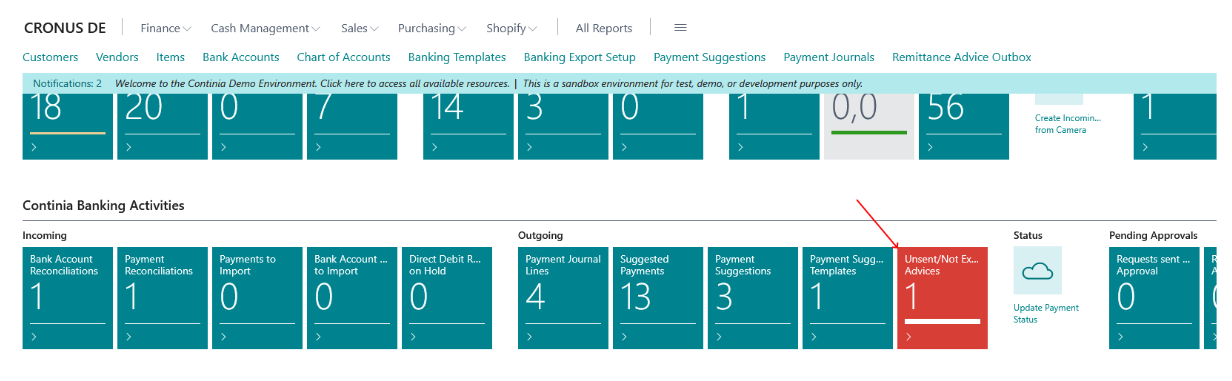
- Role Center – a red Cue appears when the Remittance Advice Outbox contains unsent entries.