Setting up payment allocation for partial payments
The partial payment allocation type splits a payment into separate entries with different amounts and due dates. This is useful when an invoice must be paid in stages, for example when a portion is due on delivery and the remainder at a later date.
The Multiple Allocations Allowed field must be turned on for the payment allocation type. For more information, see Setting up and managing payment allocations.
To set up the partial payment fields
To set up the partial payments for vendor or customer:
- Search () for and select Vendors or Customers. The following steps use a vendor as an example.
- Open the vendor card of the vendor that you want to set up the payment allocation for.
- On the action bar, click Related > Vendor > Payment Allocations
- On the Payment Allocations page, fill in the fields. For a description of all fields, see Setting up and managing payment allocations. Pay particular attention to the following:
- Payment Allocation Type Code - select the Partial Payment allocation type.
- Percentage/Amount - enter the amount or percentage for each allocation entry.
- Due Date Calculation - enter the due date for each allocation entry.
Bemærk
The due date of the latest allocation entry must be earlier than the initial invoice due date on the purchase invoice. If it is not, the entries are marked red in the Payment Allocation Preview FactBox, and the following error appears when you try to post: The due date of payment allocation <date> cannot be later than the current due date of the related entry <date>.
How partial payments are processed
When you run a suggest vendor payments in the payment journal, the system generates one allocation entry per partial amount. On the Payment Allocation Entries page, you can review the due dates for each entry.
For example, you set up the PARTIAL type for a vendor with two allocations: 101 with a due date calculation of 1M, and 202 with a due date calculation of 2M. When you post an invoice, two allocation entries are created with due dates one month apart. When you suggest payments for the first due date, one line appears with the amount of the first allocation entry. After you export and post the line, the open amount on the original entry is reduced by that amount.

When you run a payment suggestion for the first due date, one line appears with the amount of the first allocation entry.
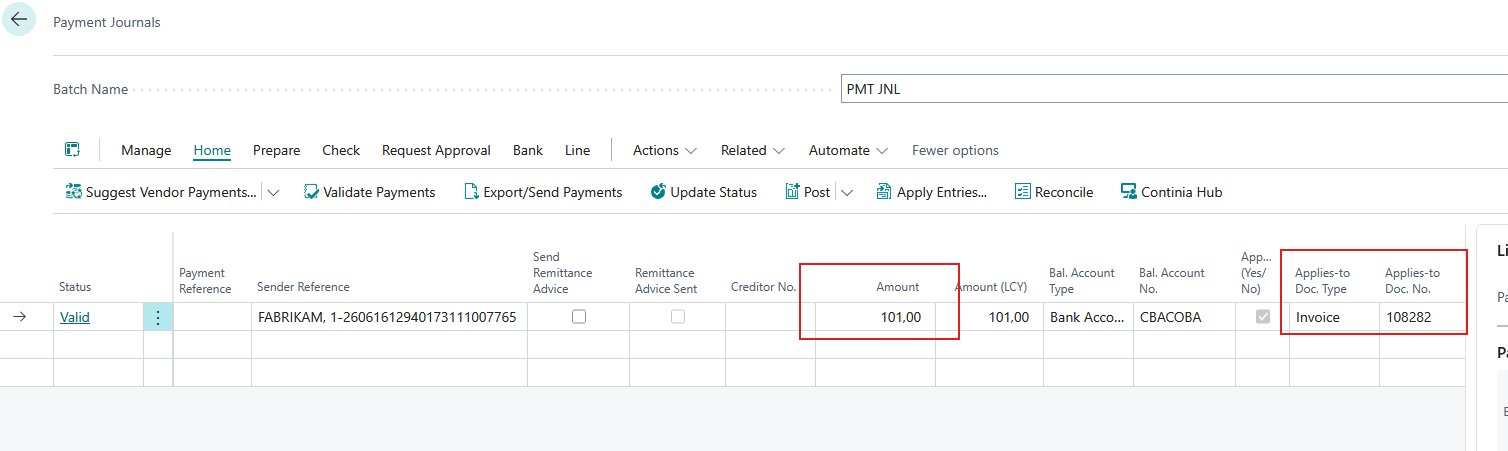
After you export and post the line, the open amount on the original line is reduced to reflect the completed partial payment.
Related information
Introducing payment allocation
Setting up partial allocation for g account
Setting up payment allocation for partial payments
Setting up payment allocation for VAT only
Setting up payment allocation for bast